


Scroll HAT Mini
Introduction
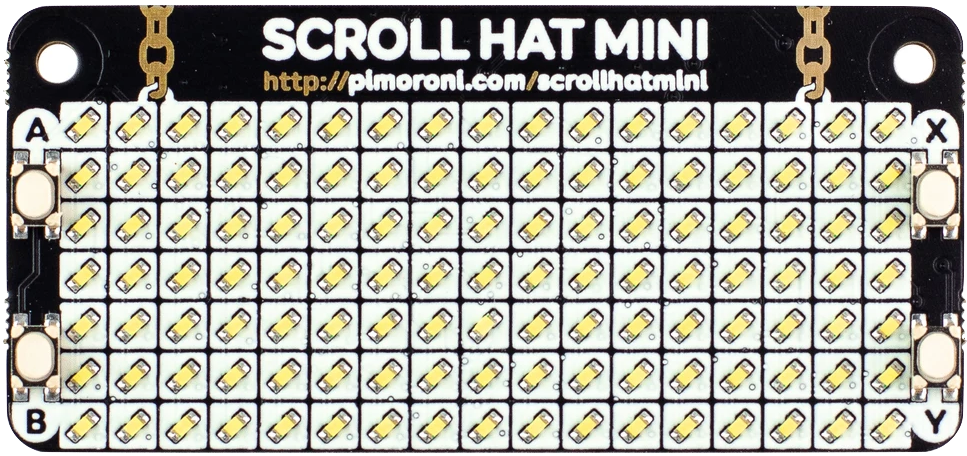
Scroll HAT mini is a 17x7 matrix of bright white LEDS that can be invdividually controlled for brightness and on/off states.
Under the hood it uses the IS31FL3731 LED matrix driver chip
Initialization
Ensure you have the :scroll_hat library installed
Mix.install([
  {:kino, "~> 0.3.0"},
  {:vega_lite, "~> 0.1.0"},
  :scroll_hat
])

alias VegaLite, as: Vl
Then initialize the display in order to start interacting with the LED's
ScrollHat.Display.start_link()Drawing
Drawing on the display can done by either passing a string to ScrollHat.Display.draw/1
ScrollHat.Display.draw("ohai")Or by building your own 17x7 LED matrix, referred to as a canvas, which consists
of integers between 0..255 where 0 sets the LED off and anything > 0 will
set the brightness of that LED to that value
canvas = [
  [5, 0, 0, 0, 0, 0, 0, 0, 5, 5, 5, 5, 0, 0, 5, 5, 5],
  [0, 0, 0, 5, 0, 5, 0, 0, 5, 5, 0, 5, 5, 0, 0, 5, 5],
  [5, 0, 5, 0, 5, 0, 5, 0, 5, 5, 0, 0, 5, 5, 0, 5, 5],
  [5, 0, 5, 0, 0, 0, 5, 0, 5, 5, 0, 5, 0, 5, 0, 5, 5],
  [5, 0, 0, 5, 0, 5, 0, 0, 5, 5, 0, 5, 5, 0, 0, 5, 5],
  [5, 0, 0, 0, 5, 0, 0, 0, 5, 5, 0, 0, 5, 5, 0, 5, 5],
  [0, 0, 0, 0, 0, 0, 0, 0, 5, 5, 5, 0, 0, 5, 5, 5, 5]
]

ScrollHat.Display.draw(canvas)
You can also make the canvas scroll the display like a marquee at a
specified step interval (in ms)
Note: When scrolling, everything is shifted one position. However, only the 17x7 matrix of pixels are drawn at a time, so it is safe to add padding to the horizontal ends in order to create spacing between the beginning and end of the matrix. So next, we'll add a bit of padding to our canvas before scrolling
canvas = for row <- canvas, do: row ++ [0, 0]{step, _} = Integer.parse(IO.gets("step"))
ScrollHat.Display.marquee(canvas, step)Brightness
Brightness can be set before or after drawing a canvas of LED's
If set before a draw, it will be applied the next time text is drawn, but ignored if you supply a 17x7 canvas
If set after drawing, it will apply the brightness setting to all active LED's of the canvas
{b, _} = IO.gets("brightness") |> Integer.parse()
ScrollHat.Display.set_brightness(b)
Fonts
ScrollHat ships wth a few fonts for convenience when rendering text. Under the
hood, strings are broken down into a list of integer code points which are matched
to produce a corresponding LED matrix.
msg = "Nerves "
ScrollHat.Display.marquee(msg, 150)
String.to_charlist(msg) |> inspect(charlists: false)
Try changing the font to see the message in different ways
font_str = IO.gets("font") |> String.trim()
font = Module.safe_concat(ScrollHat.Font, font_str)
ScrollHat.Display.set_font(font)Note: In changing fonts, you may have noticed a few failed. Not all fonts support every character and are still experimental.
When you run into an error, inspect the failing integer code point to determine which character in the string might need support, or to be removed.
For example, let's say we failed to transpose character 33. We can put it in a list to see what unicode character that might be
[33]Buttons
The Scroll HAT mini has 4 buttons that are monitored independently from the display and can be started in supervison.
Supply the :handler option as either a pid, or {module, function, args} tuple
specifying when to send events to. If no handler is supplied, events are simply logged
ScrollHat.Buttons.start_link(handler: self())You can also query the current value of a button at any time
ScrollHat.Buttons.get_value(:a)Bonus: Let's make things interesting and graph each button press as it happens.
Execute the code below, and start pressing buttons! 🍻
widget =
  Vl.new(width: 400, height: 400)
  |> Vl.mark(:line)
  |> Vl.encode_field(:x, "time", type: :quantitative)
  |> Vl.encode_field(:y, "value", type: :quantitative)
  |> Vl.encode_field(:color, "button", type: :nominal)
  |> Kino.VegaLite.new()
  |> tap(&Kino.render/1)

# Add a callback to run every 250ms
Kino.VegaLite.periodically(widget, 250, 0, fn i ->
  points = [
    %{time: i, value: ScrollHat.Buttons.get_value(:a), button: :a},
    %{time: i, value: ScrollHat.Buttons.get_value(:b), button: :b},
    %{time: i, value: ScrollHat.Buttons.get_value(:x), button: :x},
    %{time: i, value: ScrollHat.Buttons.get_value(:y), button: :y}
  ]

  # Interacting with the widget is as usual
  Kino.VegaLite.push_many(widget, points, window: 100)
  # Continue with the new accumulator value
  {:cont, i + 1}
end)


